
Looking for an exit survey template that captures real feedback? You're in the right place.
I've analyzed hundreds of SaaS cancel flows. Most exit survey questions collect garbage data. The customer clicks "Too expensive," you log it in a spreadsheet, and you never learn what actually happened.
That's not a churn survey. That's a funeral guestbook.
A good customer exit survey surfaces the real reason someone is leaving - in their own words, with context you'd never think to ask about. This guide focuses on the questions themselves: what to ask, how to ask it, and how to analyze the responses.
For what to do after you capture the reason (retention offers, pause options, value screens), see our cancel flow guide.
Table of contents
- TL;DR
- What is a customer exit survey?
- The first question debate: open text vs multiple choice
- The complete exit survey template
- Exit survey questions by cancellation reason
- Exit survey best practices
- What to do with exit survey data
- Exit survey vs churn survey
- Exit survey examples
- The ideal exit survey (mockups)
- Key metrics to track
- Common mistakes
- FAQ
- Conclusion
TL;DR
- The best exit survey template is embedded in your cancel flow (not sent via email after)
- Start with an open text question, not multiple choice - MCQ clusters feedback and trains customers to click randomly
- Keep your exit survey questions to 2-3 max - the first question matters most
- 80% of open text responses will be useless, but the 20% that aren't are gold
- A good churn survey strategy combines in-app exit surveys with post-cancellation follow-ups
- The goal is authentic feedback - what happens next (retention offers) is covered in the cancel flow guide
What is a customer exit survey?
A customer exit survey is a short questionnaire shown to customers when they try to cancel their subscription. Unlike post-cancellation email surveys (which get 5-10% response rates), in-app exit surveys get 70-90% completion because customers must engage with them to proceed.
The exit survey is one component of a larger cancel flow. Its job is to capture the reason - what happens next (retention offers, pause options) is handled by the rest of the flow.
| Survey Type | Response Rate | Best For |
|---|---|---|
| In-app (cancel flow) | 70-90% | SaaS, subscription apps |
| Email (post-cancel) | 5-15% | Low-touch products, backup data |
| Phone/call | 20-30% | High-value B2B accounts |
The first question debate: open text vs multiple choice
Most exit survey guides tell you to start with multiple choice. We disagree.
The problem with multiple choice first
When you show customers a list of predefined reasons, two things happen:
- Clustering: Everyone's unique situation gets shoved into your buckets. "I'm consolidating tools because we got acquired and the new parent company uses something else" becomes a checkbox for "Switching to competitor."
- Random clicking: Customers who just want to cancel will click whatever gets them to the next screen fastest. Your "Too expensive" bucket fills up with people who aren't actually price-sensitive — they just picked the first option.
The result? You think you have clean, structured data. What you actually have is noise.
Why open text first works better
Yes, most customers will write nothing, or "no" or "just cancel." That's fine.
But the customers who do write something give you gold:
- The actual reason in their own words
- Context you'd never think to put in a dropdown
- Language you can use in your marketing
- Signals for who might be saveable
The 80/20 reality: 80% of open text responses will be useless. But the 20% that aren't will be more valuable than 100% of your MCQ data.
Our recommended approach
Screen 1: Open text first
Before you go - what made you decide to cancel?

[Large text field]

We read every response. Even a few words helps us improve.

[Continue]
Screen 2: Then offer categories (optional)
Which of these best matches your situation?

○ Budget / pricing concerns
○ Missing features I need
○ Not using it enough right now
○ Switching to another tool
○ Other

[Continue]
This gets you the authentic response first, then structured data second. The real story from Screen 1 is what matters most.
The complete exit survey template
Here's a ready-to-use template that prioritizes authentic feedback. This covers the survey questions only - for what comes next (retention offers, pause options), see the cancel flow guide.
Screen 1: Open text (required)
We're sorry to see you go.

Before you cancel, would you tell us why?

[Text field - 3-4 lines]

Even a sentence or two helps us improve.
This goes directly to our team.

[Continue]
Why this works: Open text captures the real story in the customer's own words. Yes, many will write nothing useful - but the ones who do give you insights you'd never get from checkboxes.
Screen 2: Category selection (optional)
Thanks. Which of these best describes your situation?

○ Too expensive / budget constraints
○ Missing features I need
○ Not using it enough
○ Switching to another tool
○ Technical issues / too hard to use
○ Other

[Continue]
Why this works: Categories let you route to different retention offers (covered in the cancel flow guide) and give you structured data for analysis. But you already have the real story from Screen 1.
Optional: Follow-up questions by reason
If you want to dig deeper based on their category selection:
| If they selected... | Follow-up question |
|---|---|
| Too expensive | "What price point would work for you?" |
| Missing features | "What feature would have made you stay?" |
| Switching to competitor | "Which tool are you switching to?" |
| Not using it enough | "What prevented you from using it more?" |
| Technical issues | "What was the main issue you ran into?" |
These are optional - you already captured the core reason. But follow-up questions can surface actionable details.
Exit survey best practices
Lead with open text
Your first question should be open-ended. Yes, you'll get junk responses. But the real ones are worth it, and you can still collect structured data on the next screen.
Keep it short
2-3 questions maximum for the survey portion. Every additional question drops completion by 10-15%.
Use clear, non-leading language
Bad: "Are you sure you want to lose access to all your data?" Good: "Before you go, would you tell us why?"
Read the responses
This sounds obvious, but most teams collect open text feedback and never read it. Block 30 minutes weekly to go through verbatim responses. Patterns will emerge.
Don't require essays
Make the text field required to proceed, but accept any input (even "no" or "x"). The friction is minimal, and the customers who want to share will share.
What to do with exit survey data
Analyzing open text responses
Since you're collecting open text first, you need a system to process it:
- Weekly review: Read every response. Tag common themes.
- Build your own categories: Let patterns emerge from actual responses, then create buckets based on what customers actually say (not what you assume they'll say).
- Quote directly: Share verbatim feedback with product and marketing teams. Customer language is more compelling than summaries.
Segment your analysis
- By plan tier (do enterprise customers leave for different reasons than SMBs?)
- By tenure (are 30-day churns different from 12-month churns?)
- By acquisition source (do certain channels bring higher-churn customers?)
Calculate your "saveable churn" rate
Not all churn is preventable. "Company shut down" and "project ended" can't be saved. But "too expensive" and "not using it enough" often can. Track what percentage of your churn falls into saveable categories - this tells you how much opportunity you have.
How a churn survey differs from an exit survey
You'll hear "churn survey" and "exit survey" used interchangeably. They're related but not identical:
| Type | When it's sent | Purpose |
|---|---|---|
| Exit survey | During cancellation flow | Capture reason in real-time |
| Churn survey | After cancellation (email) | Deeper research, win-back |
| Cancellation survey | Same as exit survey | Alternative name |
A churn survey typically goes deeper - you might ask about competitor features, pricing comparisons, or what would bring them back. It's research-focused because the customer has already left.
An exit survey (what this guide focuses on) happens before the cancellation completes. You're capturing the reason while it's fresh.
Best practice: Use an exit survey in your cancel flow, then send a churn survey via email 24-48 hours later to customers who completed cancellation. This gives you both: real-time feedback and deep research.
Exit survey examples from real SaaS companies
We analyzed exit surveys from 4 major products. None of them follow all the principles we recommend - here's what they do well and where they fall short.
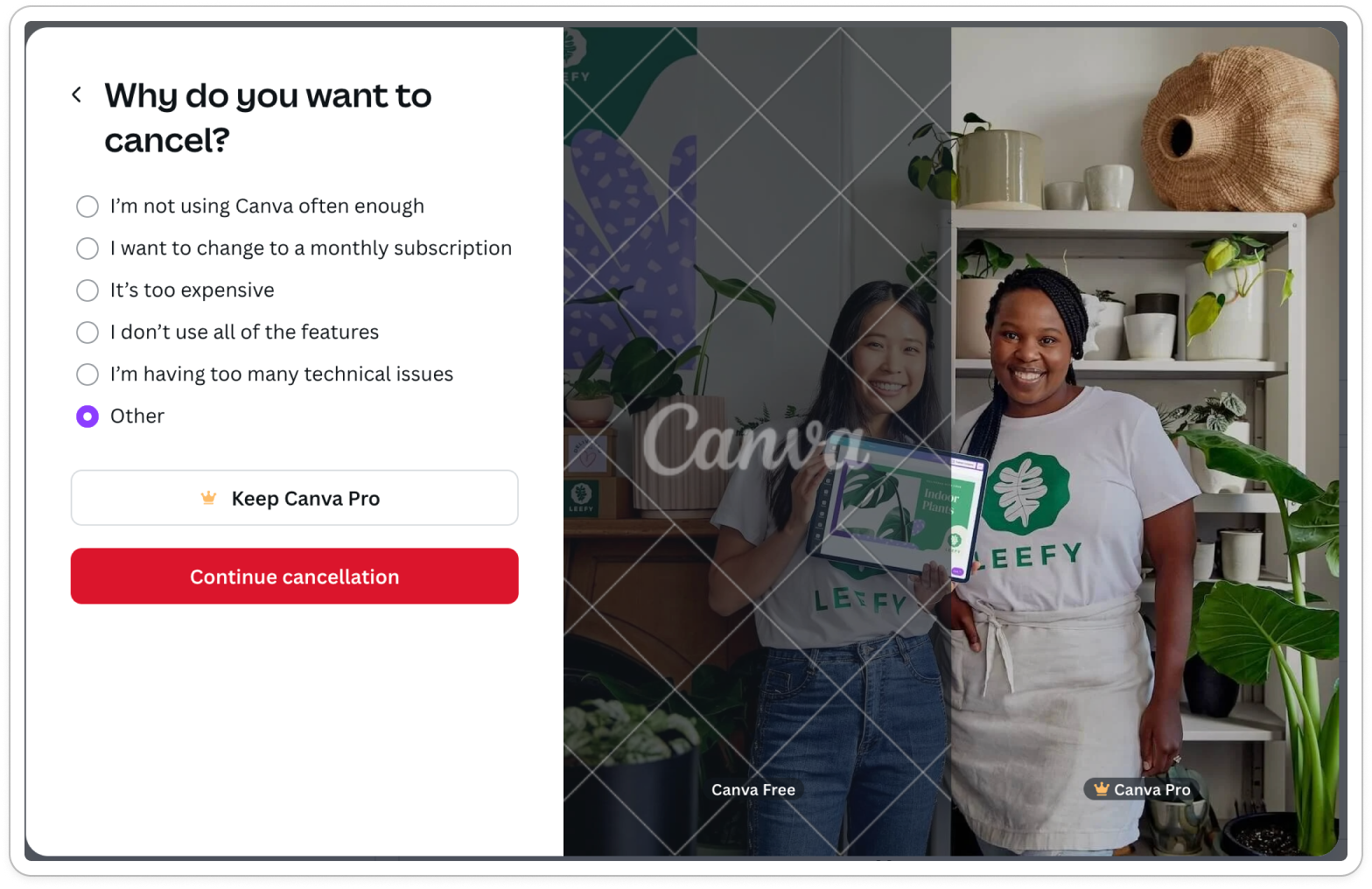
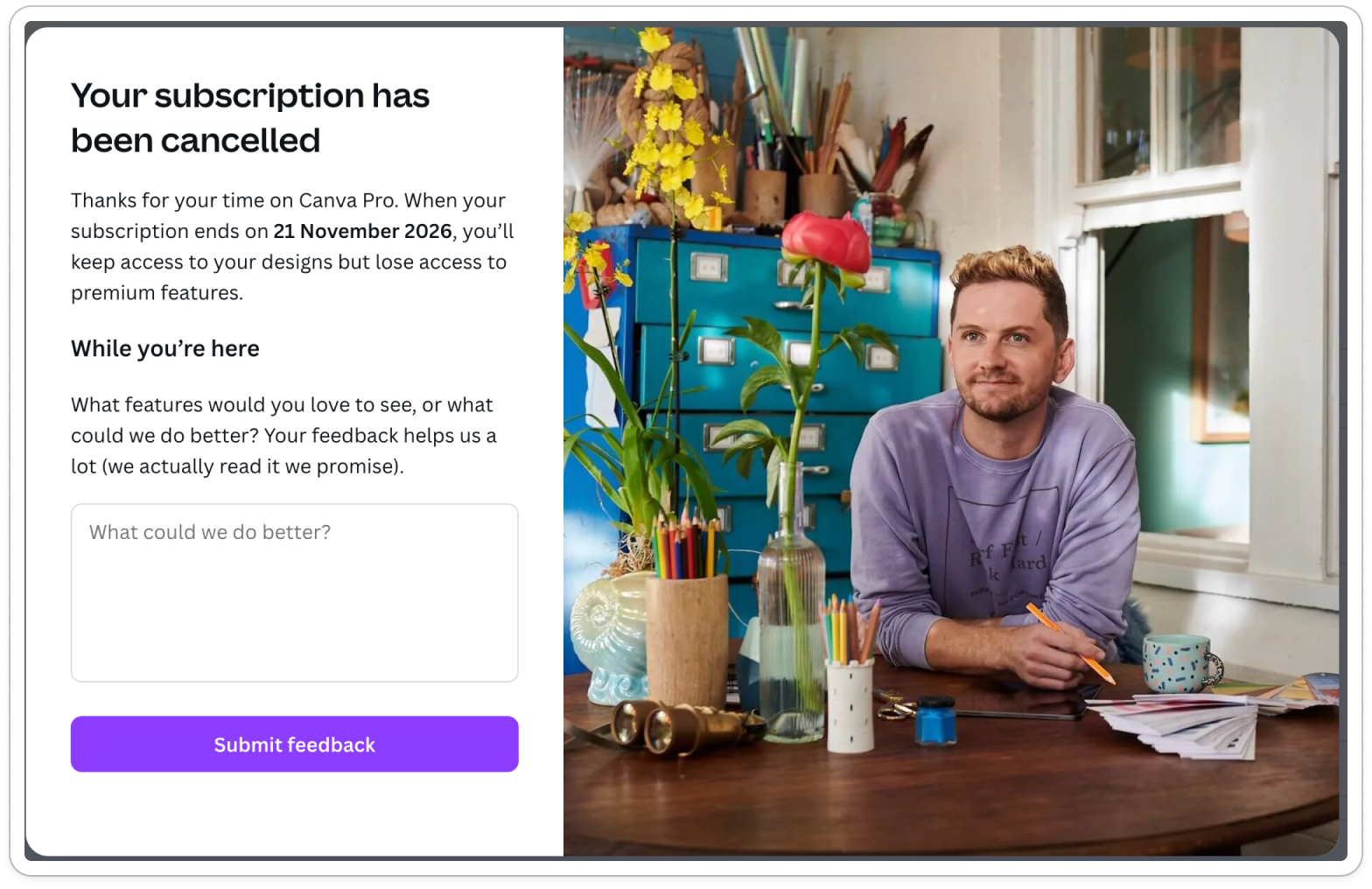
Canva
5 cancellation reasons with a post-confirmation open text field.
What works: Includes open text option if "other" is selected, and after confirmation. Reasonable number of categories (5). What's missing: Open text should be the first question, not secondary to the multiple choice options or after confirmation.
canva exit survey
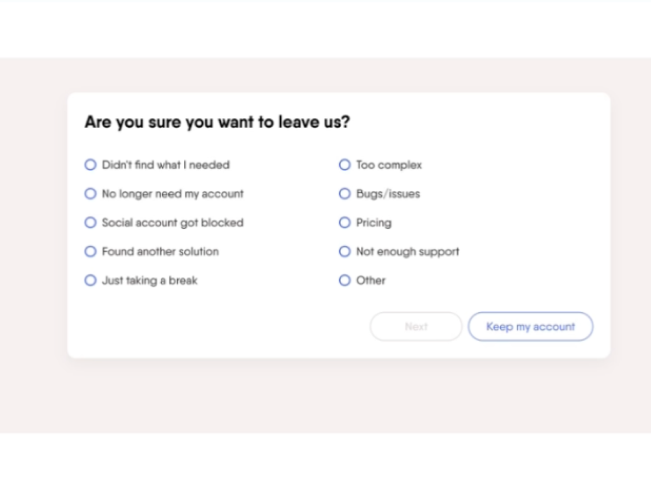
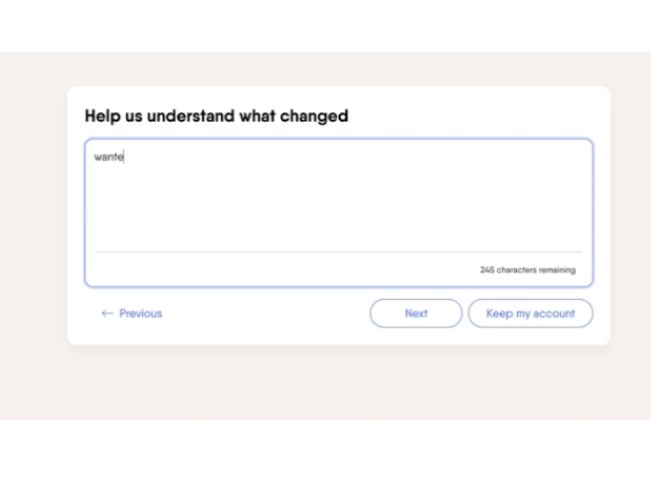
PhantomBuster
Simple modal with 9 predefined reasons and an open text option.
What works: Clean design, includes open text field as secondary optional question. What's missing: 9 options is too many - causes random clicking. Open text is secondary, not primary.
PhantomBuster exit survey
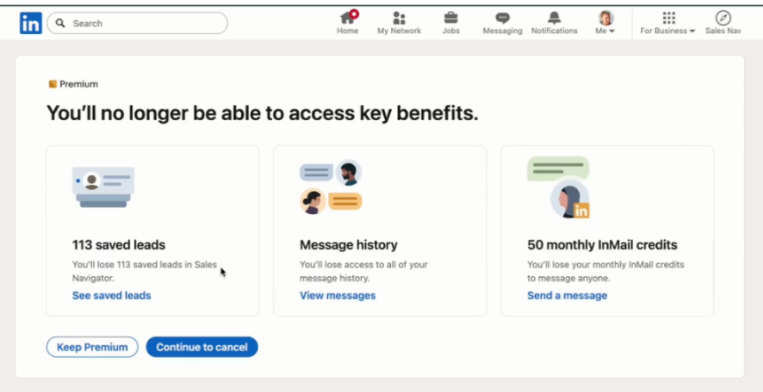
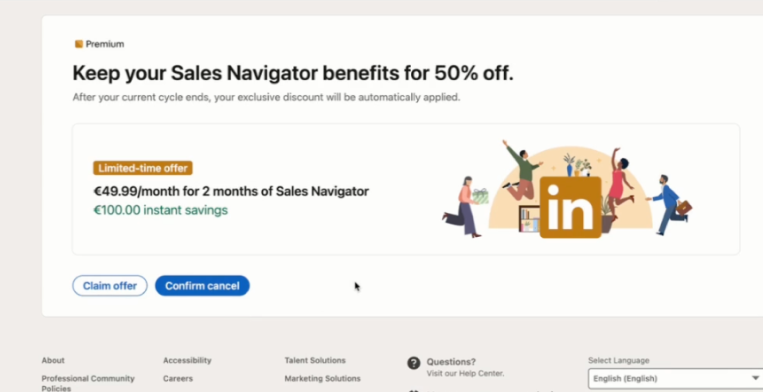
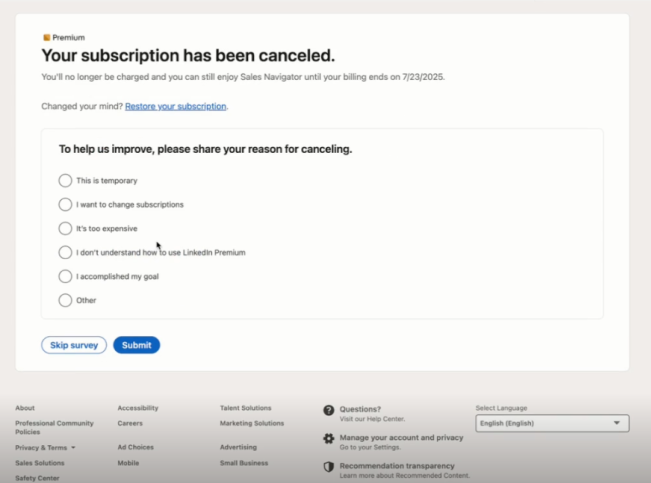
LinkedIn Sales Navigator
Simple modal with 5 predefined reasons. The exit survey is shown after the subscription is already canceled.
What works: Concise category options (5) What's missing: Survey appears after cancellation = high drop-off risk. No open text option means you miss the real story.
Sales Navigator exit survey
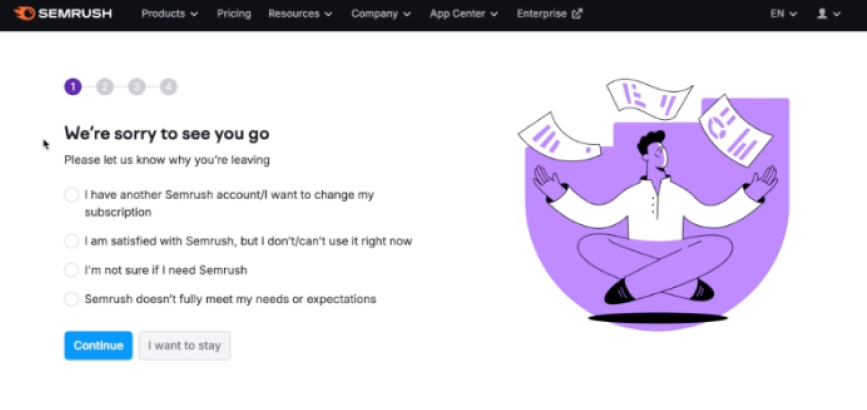
Semrush
4-part exit survey with single choice questions throughout the flow.
What works: Attempts to gather detailed feedback What's missing: Way too long - 4 screens of questions kills completion rates. Single choice only means you're forcing customers into your buckets. No open text to capture authentic reasons.
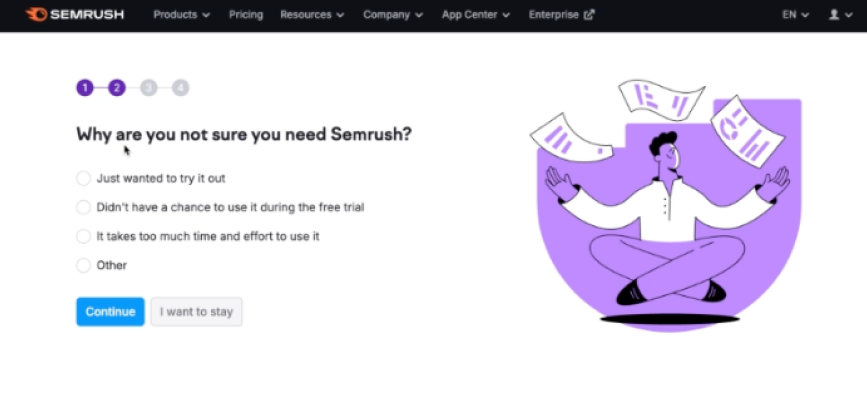
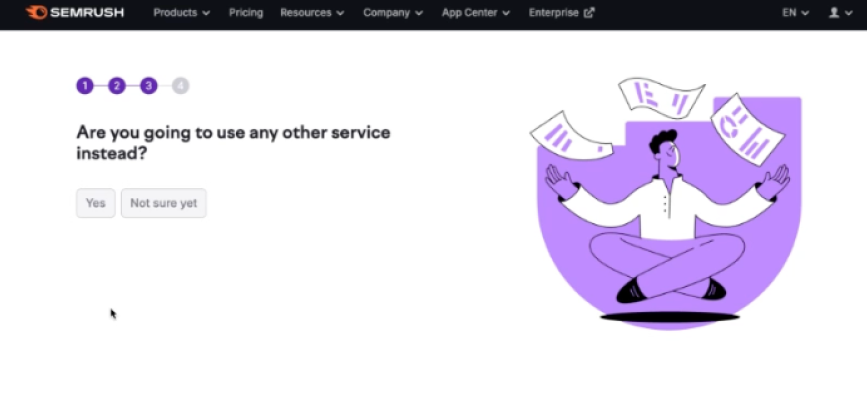
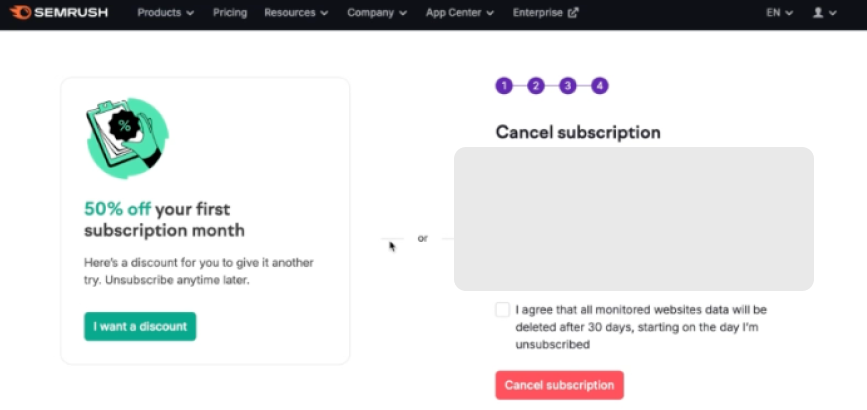
Semrush exit survey
The ideal exit survey (mockups)
Based on our analysis, here's what an exit survey should look like. For what comes after the survey (retention offers, pause options, value screens), see our cancel flow guide.
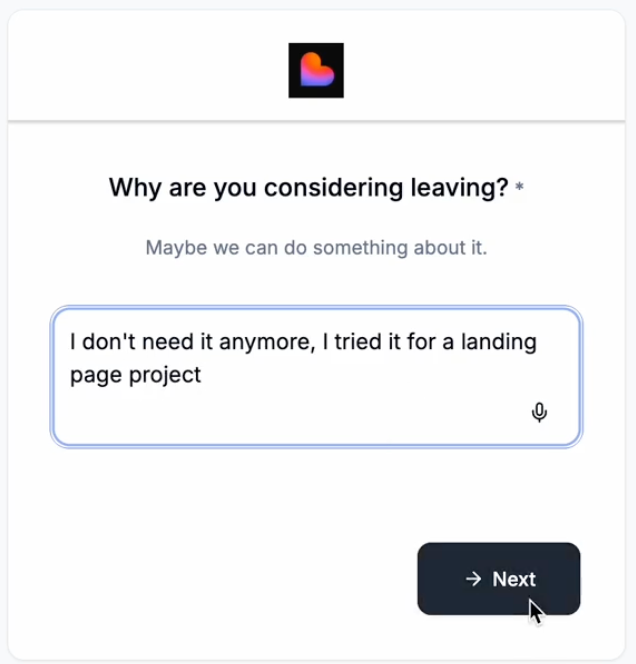
Screen 1: Open text first
Before you go - what made you decide to cancel?

[Large text field]

We read every response. Even a few words helps us improve.

[Continue]
Why this matters: Captures authentic feedback in the customer's own words, before they're influenced by your category options.
Screen 2: Category selection (optional)
Which of these best matches your situation?

○ Too expensive / budget constraints
○ Missing features I need
○ Not using it enough right now
○ Switching to another tool
○ Other

[Continue]
Why this matters: Gives you structured data for analysis and allows you to route to personalized retention offers (covered in the cancel flow guide).
Key metrics to track
| Metric | What it tells you | Good benchmark |
|---|---|---|
| Survey completion rate | Is your survey too long? | >80% |
| Open text response rate | Are customers engaging authentically? | 30-50% write something meaningful |
| Category distribution | Are your categories capturing real reasons? | No single category >40% |
| Response quality | Are you getting actionable insights? | 20%+ responses contain specific details |
Common exit survey mistakes
Using only multiple choice
MCQ gives you neat categories but hides the real story. Always include open text - ideally first.
Asking too many questions
If your survey has more than 3 questions, you're doing research at the wrong time. Keep it short.
Using leading or guilt-tripping language
Bad: "Are you sure? You'll lose all your progress." Good: "Before you go, would you tell us why?"
Email-only surveys
By the time you send the email, they've already mentally moved on. In-app surveys during the cancel flow get 5-10x better response rates.
Not reading the responses
The most common mistake. Teams collect feedback religiously, then never look at it. Block 30 minutes weekly to read verbatim responses.
Conclusion
Most exit survey templates optimize for clean data. We think that's backwards.
Start with open text. Yes, most responses will be useless. But the ones that aren't will tell you exactly why customers leave - in their own words, with context you'd never think to ask about.
Then use category selection to get structured data for analysis. This hybrid approach gives you both: authentic insights and clean reporting.
The exit survey is just one part of your cancel flow. For what comes next - retention offers, pause options, value screens - see our cancel flow guide.
FAQ
What's the best exit survey template for SaaS?
Start with an open text question ("Why are you canceling?"), then a category selection. Keep it to 2-3 questions max. See our complete template above.
How many exit survey questions should I ask?
2-3 questions maximum. Each additional question reduces completion rate by 10-15%. The first question is the most important.
Should I require an answer to the open text question?
Make it required to proceed, but accept any input (even "no" or "x"). The friction is minimal, and the customers who want to share will share.
What's the difference between an exit survey and a churn survey?
An exit survey happens during the cancellation flow - it captures the reason in real-time. A churn survey is sent after cancellation (usually via email) and goes deeper into research and win-back.
How do I analyze open text responses at scale?
Weekly manual review works up to ~100 cancellations/month. Beyond that, use AI summarization or tagging tools, but still read a sample of raw responses regularly.
What if customers write garbage in the open text field?
They will. That's fine. You're optimizing for the 20-30% who write something real, not the 70-80% who don't. The signal-to-noise ratio is still better than purely random MCQ clicks.
When should I send a post-cancellation churn survey email?
24-48 hours after cancellation, then again at 7 and 30 days. But don't rely on email for the primary survey - in-app gets much better data.
Want to add a cancel flow to your Stripe subscription? Juttu handles exit surveys, retention offers, and analytics - live in under an hour.